.png)

I was Responsible for redesigning the APP onboarding session.
Client
BreakFree Inc.
Duration
3 weeks
Problem
We lost many users during onboarding session.
Deliverable
Refined user flow & Onboarding interface
What's Breakfree?
A time management App
BreakFree is an app that uses solo and friend challenges, app blocking, and paid rewards to enable people to take control of their social media usage. As BreakFree's user base continues to grow we set out to simplify the key feature experience (create challenges, redeem rewards) and shipped new customization features that enable users to track their progress.
Internal and external users
100+
Context
Project goal
Design and build a onboarding workflow that will enable users to complete settings while keep their interests in this App.
Major issues
Usability issues
During the initial research phase with MVP users, a significant number of them encountered challenges in completing the product's core task. Despite the stakeholder's efforts to secure new grants/funding and develop new features, there were unresolved usability issues that persisted.
We lost users during onboarding session.
The app onboarding session takes too long, so our users lose patience.


Process
1. Understanding the need of target users
Our users are young students.

Process
2. Identify pain points
The onboarding took too long.
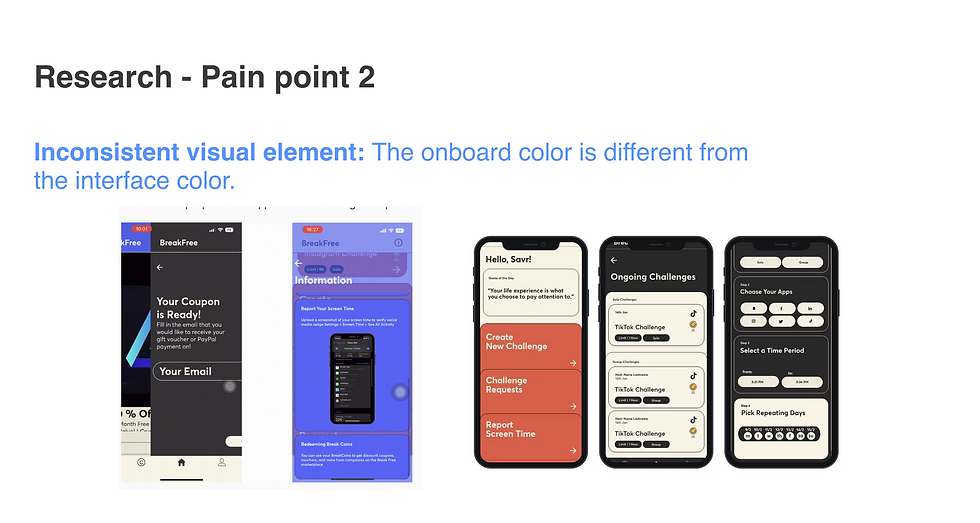
Process
2. Identify pain point
Inconsistent visual element.
Solution1: Establish brand identity
CEO envisioned the app with a bright and natural feel. To achieve this, I designed a color and visual system featuring shades of green and other vibrant, light tones.


Solution 2: Simplify onboarding steps
Only keep the most impactful settings on onboarding session.

Solution:
1. Keep the essential steps for logging in and registering.
2. Include short and exciting introduction of this App.
3. Design tutorial guide when first-time users open the App.
Before


After

I designed 3 pages onboarding page that introduce the app. This way, the user gets an idea of what the app will give them before opening the App and it won't take more than 3 seconds. Plus, the exciting graphic design won't bore our users!
.png)
I bring "input user information" and "set up challenges" into first-time user tutorial.
The fascinating 3D design leads the user through the application.
Impact
Build a community and expand the scale of the product
